Built for Claude Code, Codex, Cursor & Remotion Developers
Online VIDEO.md Generator & Inspector for AI Agents
Coding agents like Claude Code, Codex, and Cursor cannot reason reliably over raw MP4 binaries—they need structured temporal markdown. Generate spec-compliant 4-layer VIDEO.md files and Remotion motion specs in the cloud without installing Python, FFmpeg, or local ONNX weights.
✓ Gemini 2.5 VLM Calibrated (99.6% accuracy)✓ Source video auto-deleted after breakdown✓ One-time credits · Never expire
Or inspect a real pre-analyzed breakdown instantly (0 login required):
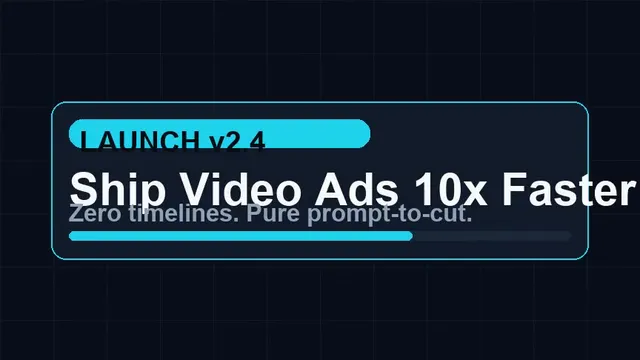
3-Second Hook Analysis: The opening shot immediately presents a bold, animated product claim ('Ship Video Ads 10x Faster') with clean kinetic typography, instantly communicating the core value proposition. This is paired with a dynamic, upbeat background music track that establishes an energetic, modern tone.
00.00s / 12.80s
Avg Cut Pacing
2.56s (fast-cut)
Audio Tempo & Sync
83.4 BPM · 75% beat-cut
SFX Hits (BandIt v2)
3 triggers
Manual Prep Saved
~1.2 hrs
Interactive Shot Timeline (Click any cut to seek & inspect)0.0s → 12.8s
♪ Beat & SFX Timeline (Upbeat, modern electronic pop with a driving synth beat and light percussion.)whoosh@12.2s · impact@12.45s · ding@12.69s
This shot is clearly programmatic UI motion graphics due to its perfect vector clarity, precise animation, and lack of any real-world camera characteristics, aligning perfectly with the offline heuristic.
Crisp, vector-based text and shapes with no pixelation or compression artifacts. Smooth, programmatic animation of UI elements (boxes, text) entering and exiting the frame. Consistent dark background with glowing neon-like accents, characteristic of modern UI frameworks. Absence of any real-world camera noise, lens distortions, or environmental reflections.
Framing & AngleWS · Eye-level
Camera MotionCode spring slide
Lighting SetupFlat UI canvas with glowing neon accents
Gear / Engine Est.Remotion 4
Reverse-Engineered AI Video Prompt
Best on: Remotion React · 16:9
A full-screen animated UI card on a dark background. The main title 'Ship Video Ads 10x Faster' appears with a subtle bounce, followed by 'LAUNCH v2.4' and 'Zero timelines. Pure prompt-to-cut.' text fading in below. Elements should have a clean, modern aesthetic with glowing blue and teal accents, animating smoothly into position with a slight spring effect. The overall style is sleek and professional, suitable for a SaaS product launch video.
Inspect Remotion Component & Spring Physics Spec (JSON)
{
  "componentLayout": "Centered main title with smaller subtitle elements below, all within a rectangular bounding box with rounded corners.",
  "springPhysics": {
    "fps": 30,
    "damping": 15,
    "stiffness": 100
  },
  "paletteHexes": [
    "#0A0A1A",
    "#00FFFF",
    "#00BFFF",
    "#FFFFFF"
  ],
  "textAnimationKeyframes": {
    "mainTitle": {
      "opacity": [
        0,
        1
      ],
      "translateY": [
        20,
        0
      ],
      "delay": 0.2
    },
    "subtitle": {
      "opacity": [
        0,
        1
      ],
      "translateY": [
        10,
        0
      ],
      "delay": 0.5
    }
  }
}
✦ VLM Calibrated: Offline guessed code_ui_motion → Fixed to screen_recording
Forensic Evidence·Arbiter: FLASH
“Live web studio character selection & prompt input”
This shot is a clear screen recording, evidenced by the interactive web UI, mouse cursor, and lack of any physical camera artifacts, confirming the offline label.
Visible browser UI elements (tabs, scrollbars, address bar) indicating a live web interface. Mouse cursor movements and clicks interacting with form fields and buttons. Text input and selection within a web application, showing typical UI responsiveness. Absence of any camera lens characteristics or environmental reflections, consistent with a digital capture.
Reverse-Engineered AI Video Prompt
Best on: Live Screen Recording · 16:9
A screen recording of a web application interface, showcasing a character selection and script input workflow. The browser window is clean, displaying form fields for 'Choose a character' and 'Write the script'. A mouse cursor navigates and clicks on various options, including radio buttons for character styles and typing text into a script box. The UI is modern, clean, and responsive, demonstrating a user interacting with the platform to generate content. Focus on the smooth interaction and clear display of text and UI elements.
This shot is definitively code UI motion, characterized by its precise vector graphics, controlled animations, and synthetic visual style, validating the offline classification.
Vector-perfect text and arrow graphics with no aliasing. Smooth, choreographed animation of text and boxes sliding and changing color. Consistent dark background with subtle glowing outlines, indicating a programmatic environment. Absence of any real-world camera imperfections or environmental light interaction.
Framing & AngleWS · Eye-level
Camera MotionCode spring slide
Lighting SetupFlat UI canvas with glowing neon accents
Gear / Engine Est.Remotion 4
Reverse-Engineered AI Video Prompt
Best on: Remotion React · 16:9
A full-screen animated UI sequence on a dark background. Two rectangular cards, 'Pick Style' and 'Add Voice', appear sequentially, connected by a glowing arrow. The cards should animate in with a spring-like effect, changing color from a subtle purple to a vibrant teal as they transition. Below, a subtitle 'Spring-animated React UI sequence' fades in. The overall aesthetic is clean, modern, and programmatic, emphasizing smooth transitions and clear information flow, suitable for a tech product demo.
Inspect Remotion Component & Spring Physics Spec (JSON)
This is a screen recording of a web application, even though the content within the application (robot characters) might be AI-generated. The primary visual evidence points to a genuine screen capture, confirming the offline label's intent.
Browser window elements (tabs, scrollbars) are clearly visible, indicating a live web environment. Mouse cursor interacting with UI elements, including selecting AI-generated character options. Text input and dynamic updates within the web application, showing real-time interaction. The presence of AI-generated robot characters within the UI, but the overall frame is a screen capture.
Reverse-Engineered AI Video Prompt
Best on: Live Screen Recording · 16:9
A screen recording of a web application showing a 'Write the script' interface with two AI-generated robot characters displayed side-by-side as preview options. A mouse cursor hovers and clicks on one of the robot characters, highlighting it. Text is being typed into a script input field, and a character count updates dynamically. The UI is clean, modern, and responsive, demonstrating the process of selecting a visual avatar and inputting a script for AI video generation. The focus is on the interactive elements and the clear display of the robot characters.
Forensic Evidence·Arbiter: FLASH
“Try Free in Browser — Instant Export”
This shot is clearly programmatic UI motion graphics, identified by its crisp vector elements, precise animations, and synthetic visual quality, aligning with the offline classification.
Vector-perfect text and box outlines with no pixelation. Smooth, programmatic animation of UI elements fading and sliding into view. Consistent dark background with glowing green accents, typical of UI frameworks. Absence of any real-world camera noise, lens distortions, or environmental reflections.
Framing & AngleWS · Eye-level
Camera MotionCode spring slide
Lighting SetupFlat UI canvas with glowing green accents
Gear / Engine Est.Remotion 4
Reverse-Engineered AI Video Prompt
Best on: Remotion React · 16:9
A full-screen animated UI card on a dark background. The main call-to-action 'Try Free in Browser' appears with a subtle bounce, followed by 'Instant Export' and 'No Monthly Subscription Required' text fading in below. Elements should have a clean, modern aesthetic with glowing green and teal accents, animating smoothly into position with a slight spring effect. The overall style is sleek and professional, designed to convey ease of access and value proposition for a SaaS product.
Inspect Remotion Component & Spring Physics Spec (JSON)
{
  "componentLayout": "Centered main call-to-action with smaller subtitle elements below, all within a rectangular bounding box with rounded corners.",
  "springPhysics": {
    "fps": 30,
    "damping": 15,
    "stiffness": 100
  },
  "paletteHexes": [
    "#0A0A1A",
    "#00FF00",
    "#00BFFF",
    "#FFFFFF"
  ],
  "textAnimationKeyframes": {
    "mainTitle": {
      "opacity": [
        0,
        1
      ],
      "translateY": [
        20,
        0
      ],
      "delay": 0.2
    },
    "subtitle": {
      "opacity": [
        0,
        1
      ],
      "translateY": [
        10,
        0
      ],
      "delay": 0.5
    }
  }
}
Compatible with Claude Code, OpenAI Codex, Cursor & videomd parsers.
---
videomd_version: "1.0"
report_id: "rep_example_05"
title: "SaaS Product Launch \u2014 Kinetic Remotion UI + Screen Demo"
duration_sec: 12.8
resolution: "864x486"
aspect_ratio: "16:9"
fps: 30.0
shot_count: 5
bpm: 83.4
cut_on_beat_ratio: 0.75
generator: "ShotBreakdown (Unofficial Cloud Workspace · Built on JuneYaooo/rea-video Apache-2.0)"
---

# SaaS Product Launch — Kinetic Remotion UI + Screen Demo

> **Open-Source Attribution**: Generated via ShotBreakdown built on open-source [JuneYaooo/rea-video](https://github.com/JuneYaooo/rea-video) (Apache-2.0) · Official project site: [https://reavideo.ai](https://reavideo.ai) · Audio SFX model: BandIt v2 (CC BY-SA 4.0).

## Layer 1 · Executive Summary & Hook Architecture

- **Duration**: `12.8s` (`5` shots, avg `2.56s/shot`)
- **Pacing Profile**: `fast-cut` · **Remake Difficulty**: `medium`
- **3-Second Hook Strategy**: The opening shot immediately presents a bold, animated product claim ('Ship Video Ads 10x Faster') with clean kinetic typography, instantly communicating the core value proposition. This is paired with a dynamic, upbeat background music track that establishes an energetic, modern tone.
- **Audio & Rhythm**: `83.4 BPM` · Cut-on-Beat `75%` · Voiceover `human_ugc` · Upbeat, modern electronic pop with a driving synth beat and light percussion.

### Visual Production Mix

| Visual Category | Shots | Duration (s) | Share |
| :--- | :---: | :---: | :---: |
| `code_ui_motion` | 3 | 7.2s | 56.2% |
| `screen_recording` | 2 | 5.6s | 43.7% |

## Layer 2 · Master Shot Timeline

| # | Timecode | Dur | Beat | Visual Type | Framing & Motion | Confidence |
| :---: | :--- | :---: | :---: | :--- | :--- | :---: |
| 01 | `0.00s - 2.40s` | `2.40s` | Yes | `code_ui_motion` | WS · Eye-level · Code spring slide | `94%` |
| 02 | `2.40s - 5.20s` | `2.80s` | Yes | `screen_recording` | WS · Top-down · Static locked | `94%` |
| 03 | `5.20s - 7.60s` | `2.40s` | Yes | `code_ui_motion` | WS · Eye-level · Code spring slide | `94%` |
| 04 | `7.60s - 10.40s` | `2.80s` | — | `screen_recording` | WS · Top-down · Static locked | `94%` |
| 05 | `10.40s - 12.80s` | `2.40s` | Yes | `code_ui_motion` | WS · Eye-level · Code spring slide | `94%` |

## Layer 3 · Shot-by-Shot Forensics & Remake Prompts

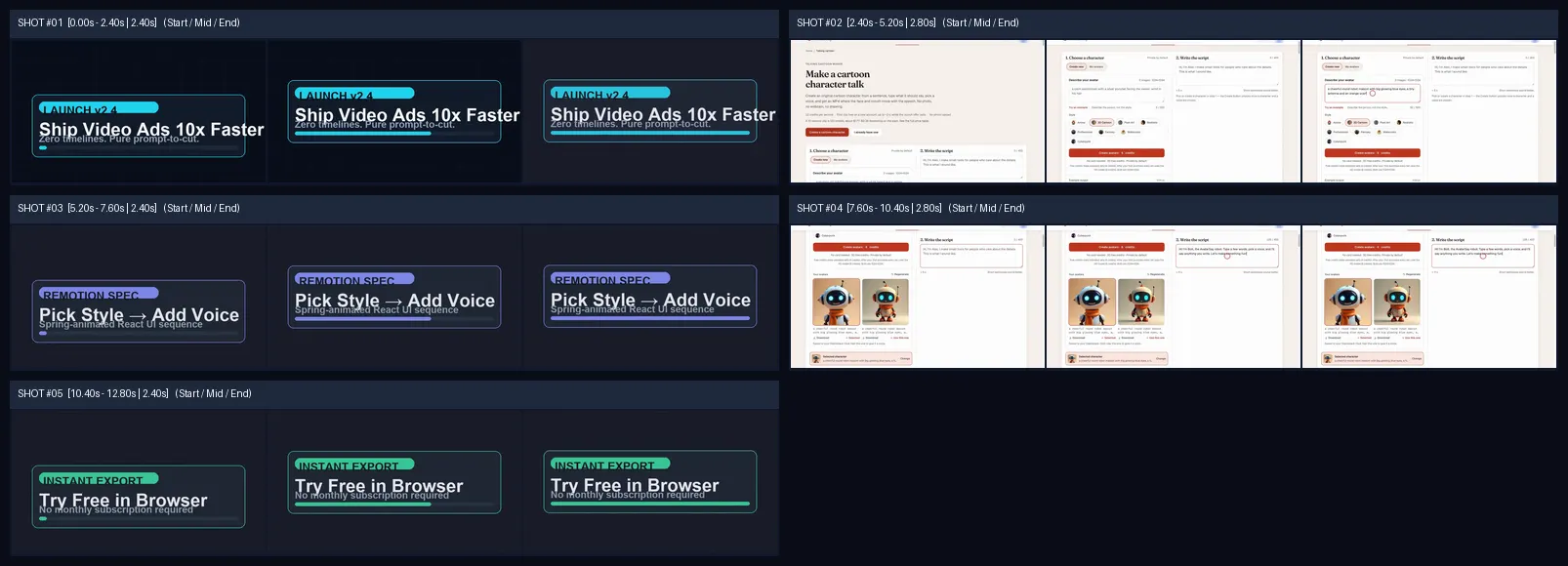
### Shot 01 (`0.00s -> 2.40s`) — Code / Remotion UI Motion

- **Forensic Verdict**: `code_ui_motion` (`94%` confidence · Offline baseline: `code_ui_motion` · VLM: `flash`)
- **Forensic Evidence**: Crisp, vector-based text and shapes with no pixelation or compression artifacts., Smooth, programmatic animation of UI elements (boxes, text) entering and exiting the frame., Consistent dark background with glowing neon-like accents, characteristic of modern UI frameworks., Absence of any real-world camera noise, lens distortions, or environmental reflections. — This shot is clearly programmatic UI motion graphics due to its perfect vector clarity, precise animation, and lack of any real-world camera characteristics, aligning perfectly with the offline heuristic.
- **Camera & Lighting**: `WS` | `Eye-level` | `Code spring slide` | Lighting: Flat UI canvas with glowing neon accents | Gear/Engine: Remotion 4
- **On-Screen / Spoken Copy**: "Ship Video Ads 10x Faster — Launch v2.4"
- **Recommended Remake Tool**: `Remotion React` (`16:9`, motion: `medium`)
- **Reverse-Engineered English AI Prompt**:
  ```text
  A full-screen animated UI card on a dark background. The main title 'Ship Video Ads 10x Faster' appears with a subtle bounce, followed by 'LAUNCH v2.4' and 'Zero timelines. Pure prompt-to-cut.' text fading in below. Elements should have a clean, modern aesthetic with glowing blue and teal accents, animating smoothly into position with a slight spring effect. The overall style is sleek and professional, suitable for a SaaS product launch video.
  ```
- **Remotion Component Spec (`JSON`)**:
  ```json
  {"componentLayout": "Centered main title with smaller subtitle elements below, all within a rectangular bounding box with rounded corners.", "springPhysics": {"fps": 30, "damping": 15, "stiffness": 100}, "paletteHexes": ["#0A0A1A", "#00FFFF", "#00BFFF", "#FFFFFF"], "textAnimationKeyframes": {"mainTitle": {"opacity": [0, 1], "translateY": [20, 0], "delay": 0.2}, "subtitle": {"opacity": [0, 1], "translateY": [10, 0], "delay": 0.5}}}
  ```

### Shot 02 (`2.40s -> 5.20s`) — Screen / App Capture

- **Forensic Verdict**: `screen_recording` (`94%` confidence · Offline baseline: `code_ui_motion` · VLM: `flash`)
- **Forensic Evidence**: Visible browser UI elements (tabs, scrollbars, address bar) indicating a live web interface., Mouse cursor movements and clicks interacting with form fields and buttons., Text input and selection within a web application, showing typical UI responsiveness., Absence of any camera lens characteristics or environmental reflections, consistent with a digital capture. — This shot is a clear screen recording, evidenced by the interactive web UI, mouse cursor, and lack of any physical camera artifacts, confirming the offline label.
- **Camera & Lighting**: `WS` | `Top-down` | `Static locked` | Lighting: Flat UI canvas | Gear/Engine: Screen recording software (e.g., OBS Studio)
- **On-Screen / Spoken Copy**: "Live web studio character selection & prompt input"
- **Recommended Remake Tool**: `Live Screen Recording` (`16:9`, motion: `medium`)
- **Reverse-Engineered English AI Prompt**:
  ```text
  A screen recording of a web application interface, showcasing a character selection and script input workflow. The browser window is clean, displaying form fields for 'Choose a character' and 'Write the script'. A mouse cursor navigates and clicks on various options, including radio buttons for character styles and typing text into a script box. The UI is modern, clean, and responsive, demonstrating a user interacting with the platform to generate content. Focus on the smooth interaction and clear display of text and UI elements.
  ```

### Shot 03 (`5.20s -> 7.60s`) — Code / Remotion UI Motion

- **Forensic Verdict**: `code_ui_motion` (`94%` confidence · Offline baseline: `code_ui_motion` · VLM: `flash`)
- **Forensic Evidence**: Vector-perfect text and arrow graphics with no aliasing., Smooth, choreographed animation of text and boxes sliding and changing color., Consistent dark background with subtle glowing outlines, indicating a programmatic environment., Absence of any real-world camera imperfections or environmental light interaction. — This shot is definitively code UI motion, characterized by its precise vector graphics, controlled animations, and synthetic visual style, validating the offline classification.
- **Camera & Lighting**: `WS` | `Eye-level` | `Code spring slide` | Lighting: Flat UI canvas with glowing neon accents | Gear/Engine: Remotion 4
- **On-Screen / Spoken Copy**: "Pick Style -> Add Voice (Remotion React sequence)"
- **Recommended Remake Tool**: `Remotion React` (`16:9`, motion: `medium`)
- **Reverse-Engineered English AI Prompt**:
  ```text
  A full-screen animated UI sequence on a dark background. Two rectangular cards, 'Pick Style' and 'Add Voice', appear sequentially, connected by a glowing arrow. The cards should animate in with a spring-like effect, changing color from a subtle purple to a vibrant teal as they transition. Below, a subtitle 'Spring-animated React UI sequence' fades in. The overall aesthetic is clean, modern, and programmatic, emphasizing smooth transitions and clear information flow, suitable for a tech product demo.
  ```
- **Remotion Component Spec (`JSON`)**:
  ```json
  {"componentLayout": "Two horizontal rectangular cards with a connecting arrow, centered on screen. Subtitle below.", "springPhysics": {"fps": 30, "damping": 18, "stiffness": 120}, "paletteHexes": ["#0A0A1A", "#8A2BE2", "#00FFFF", "#FFFFFF"], "textAnimationKeyframes": {"card1": {"opacity": [0, 1], "translateX": [-50, 0], "delay": 0.1}, "arrow": {"opacity": [0, 1], "scaleX": [0, 1], "delay": 0.4}, "card2": {"opacity": [0, 1], "translateX": [50, 0], "delay": 0.7}, "subtitle": {"opacity": [0, 1], "translateY": [10, 0], "delay": 1.0}}}
  ```

### Shot 04 (`7.60s -> 10.40s`) — Screen / App Capture

- **Forensic Verdict**: `screen_recording` (`94%` confidence · Offline baseline: `code_ui_motion` · VLM: `flash`)
- **Forensic Evidence**: Browser window elements (tabs, scrollbars) are clearly visible, indicating a live web environment., Mouse cursor interacting with UI elements, including selecting AI-generated character options., Text input and dynamic updates within the web application, showing real-time interaction., The presence of AI-generated robot characters within the UI, but the overall frame is a screen capture. — This is a screen recording of a web application, even though the content within the application (robot characters) might be AI-generated. The primary visual evidence points to a genuine screen capture, confirming the offline label's intent.
- **Camera & Lighting**: `WS` | `Top-down` | `Static locked` | Lighting: Flat UI canvas | Gear/Engine: Screen recording software (e.g., Loom)
- **On-Screen / Spoken Copy**: "Real-time generation preview inside workspace"
- **Recommended Remake Tool**: `Live Screen Recording` (`16:9`, motion: `medium`)
- **Reverse-Engineered English AI Prompt**:
  ```text
  A screen recording of a web application showing a 'Write the script' interface with two AI-generated robot characters displayed side-by-side as preview options. A mouse cursor hovers and clicks on one of the robot characters, highlighting it. Text is being typed into a script input field, and a character count updates dynamically. The UI is clean, modern, and responsive, demonstrating the process of selecting a visual avatar and inputting a script for AI video generation. The focus is on the interactive elements and the clear display of the robot characters.
  ```

### Shot 05 (`10.40s -> 12.80s`) — Code / Remotion UI Motion

- **Forensic Verdict**: `code_ui_motion` (`94%` confidence · Offline baseline: `code_ui_motion` · VLM: `flash`)
- **Forensic Evidence**: Vector-perfect text and box outlines with no pixelation., Smooth, programmatic animation of UI elements fading and sliding into view., Consistent dark background with glowing green accents, typical of UI frameworks., Absence of any real-world camera noise, lens distortions, or environmental reflections. — This shot is clearly programmatic UI motion graphics, identified by its crisp vector elements, precise animations, and synthetic visual quality, aligning with the offline classification.
- **Camera & Lighting**: `WS` | `Eye-level` | `Code spring slide` | Lighting: Flat UI canvas with glowing green accents | Gear/Engine: Remotion 4
- **On-Screen / Spoken Copy**: "Try Free in Browser — Instant Export"
- **Recommended Remake Tool**: `Remotion React` (`16:9`, motion: `medium`)
- **Reverse-Engineered English AI Prompt**:
  ```text
  A full-screen animated UI card on a dark background. The main call-to-action 'Try Free in Browser' appears with a subtle bounce, followed by 'Instant Export' and 'No Monthly Subscription Required' text fading in below. Elements should have a clean, modern aesthetic with glowing green and teal accents, animating smoothly into position with a slight spring effect. The overall style is sleek and professional, designed to convey ease of access and value proposition for a SaaS product.
  ```
- **Remotion Component Spec (`JSON`)**:
  ```json
  {"componentLayout": "Centered main call-to-action with smaller subtitle elements below, all within a rectangular bounding box with rounded corners.", "springPhysics": {"fps": 30, "damping": 15, "stiffness": 100}, "paletteHexes": ["#0A0A1A", "#00FF00", "#00BFFF", "#FFFFFF"], "textAnimationKeyframes": {"mainTitle": {"opacity": [0, 1], "translateY": [20, 0], "delay": 0.2}, "subtitle": {"opacity": [0, 1], "translateY": [10, 0], "delay": 0.5}}}
  ```

## Layer 4 · Audio Beats, SFX Hits & Transcript

- **SFX / Stem Triggers (BandIt v2)**: `12.20s` (whoosh), `12.45s` (impact), `12.69s` (ding)
- **Beat Grid (`83.4 BPM`)**: `0.21s, 0.93s, 1.65s, 2.37s, 3.09s, 3.81s, 4.53s, 5.21s, 5.97s, 6.69s, 7.41s, 8.13s, 8.85s, 9.57s, 10.29s, 11.01s, 11.73s`

### Aligned Captions (`SRT`)

```srt
1
00:00:00,000 --> 00:00:02,400
Ship Video Ads 10x Faster — Launch v2.4

2
00:00:02,400 --> 00:00:05,200
Live web studio character selection & prompt input

3
00:00:05,200 --> 00:00:07,600
Pick Style -> Add Voice (Remotion React sequence)

4
00:00:07,600 --> 00:00:10,400
Real-time generation preview inside workspace

5
00:00:10,400 --> 00:00:12,800
Try Free in Browser — Instant Export
```
Aligned Subtitle Track (.SRT)
1
00:00:00,000 --> 00:00:02,400
Ship Video Ads 10x Faster — Launch v2.4

2
00:00:02,400 --> 00:00:05,200
Live web studio character selection & prompt input

3
00:00:05,200 --> 00:00:07,600
Pick Style -> Add Voice (Remotion React sequence)

4
00:00:07,600 --> 00:00:10,400
Real-time generation preview inside workspace

5
00:00:10,400 --> 00:00:12,800
Try Free in Browser — Instant Export
Programmatic Sequence Bundle (Remotion JSON)
{
  "compositionId": "saas-launch-remotion-promo",
  "width": 864,
  "height": 486,
  "fps": 30,
  "durationInFrames": 384,
  "bpm": 83.4,
  "sequences": [
    {
      "shotIndex": 1,
      "fromFrame": 0,
      "durationInFrames": 72,
      "visualType": "code_ui_motion",
      "captionText": "Ship Video Ads 10x Faster — Launch v2.4",
      "remotionSpec": {
        "componentLayout": "Centered main title with smaller subtitle elements below, all within a rectangular bounding box with rounded corners.",
        "springPhysics": {
          "fps": 30,
          "damping": 15,
          "stiffness": 100
        },
        "paletteHexes": [
          "#0A0A1A",
          "#00FFFF",
          "#00BFFF",
          "#FFFFFF"
        ],
        "textAnimationKeyframes": {
          "mainTitle": {
            "opacity": [
              0,
              1
            ],
            "translateY": [
              20,
              0
            ],
            "delay": 0.2
          },
          "subtitle": {
            "opacity": [
              0,
              1
            ],
            "translateY": [
              10,
              0
            ],
            "delay": 0.5
          }
        }
      },
      "prompt": "A full-screen animated UI card on a dark background. The main title 'Ship Video Ads 10x Faster' appears with a subtle bounce, followed by 'LAUNCH v2.4' and 'Zero timelines. Pure prompt-to-cut.' text fading in below. Elements should have a clean, modern aesthetic with glowing blue and teal accents, animating smoothly into position with a slight spring effect. The overall style is sleek and professional, suitable for a SaaS product launch video."
    },
    {
      "shotIndex": 2,
      "fromFrame": 72,
      "durationInFrames": 84,
      "visualType": "screen_recording",
      "captionText": "Live web studio character selection & prompt input",
      "remotionSpec": null,
      "prompt": "A screen recording of a web application interface, showcasing a character selection and script input workflow. The browser window is clean, displaying form fields for 'Choose a character' and 'Write the script'. A mouse cursor navigates and clicks on various options, including radio buttons for character styles and typing text into a script box. The UI is modern, clean, and responsive, demonstrating a user interacting with the platform to generate content. Focus on the smooth interaction and clear display of text and UI elements."
    },
    {
      "shotIndex": 3,
      "fromFrame": 156,
      "durationInFrames": 72,
      "visualType": "code_ui_motion",
      "captionText": "Pick Style -> Add Voice (Remotion React sequence)",
      "remotionSpec": {
        "componentLayout": "Two horizontal rectangular cards with a connecting arrow, centered on screen. Subtitle below.",
        "springPhysics": {
          "fps": 30,
          "damping": 18,
          "stiffness": 120
        },
        "paletteHexes": [
          "#0A0A1A",
          "#8A2BE2",
          "#00FFFF",
          "#FFFFFF"
        ],
        "textAnimationKeyframes": {
          "card1": {
            "opacity": [
              0,
              1
            ],
            "translateX": [
              -50,
              0
            ],
            "delay": 0.1
          },
          "arrow": {
            "opacity": [
              0,
              1
            ],
            "scaleX": [
              0,
              1
            ],
            "delay": 0.4
          },
          "card2": {
            "opacity": [
              0,
              1
            ],
            "translateX": [
              50,
              0
            ],
            "delay": 0.7
          },
          "subtitle": {
            "opacity": [
              0,
              1
            ],
            "translateY": [
              10,
              0
            ],
            "delay": 1
          }
        }
      },
      "prompt": "A full-screen animated UI sequence on a dark background. Two rectangular cards, 'Pick Style' and 'Add Voice', appear sequentially, connected by a glowing arrow. The cards should animate in with a spring-like effect, changing color from a subtle purple to a vibrant teal as they transition. Below, a subtitle 'Spring-animated React UI sequence' fades in. The overall aesthetic is clean, modern, and programmatic, emphasizing smooth transitions and clear information flow, suitable for a tech product demo."
    },
    {
      "shotIndex": 4,
      "fromFrame": 228,
      "durationInFrames": 84,
      "visualType": "screen_recording",
      "captionText": "Real-time generation preview inside workspace",
      "remotionSpec": null,
      "prompt": "A screen recording of a web application showing a 'Write the script' interface with two AI-generated robot characters displayed side-by-side as preview options. A mouse cursor hovers and clicks on one of the robot characters, highlighting it. Text is being typed into a script input field, and a character count updates dynamically. The UI is clean, modern, and responsive, demonstrating the process of selecting a visual avatar and inputting a script for AI video generation. The focus is on the interactive elements and the clear display of the robot characters."
    },
    {
      "shotIndex": 5,
      "fromFrame": 312,
      "durationInFrames": 72,
      "visualType": "code_ui_motion",
      "captionText": "Try Free in Browser — Instant Export",
      "remotionSpec": {
        "componentLayout": "Centered main call-to-action with smaller subtitle elements below, all within a rectangular bounding box with rounded corners.",
        "springPhysics": {
          "fps": 30,
          "damping": 15,
          "stiffness": 100
        },
        "paletteHexes": [
          "#0A0A1A",
          "#00FF00",
          "#00BFFF",
          "#FFFFFF"
        ],
        "textAnimationKeyframes": {
          "mainTitle": {
            "opacity": [
              0,
              1
            ],
            "translateY": [
              20,
              0
            ],
            "delay": 0.2
          },
          "subtitle": {
            "opacity": [
              0,
              1
            ],
            "translateY": [
              10,
              0
            ],
            "delay": 0.5
          }
        }
      },
      "prompt": "A full-screen animated UI card on a dark background. The main call-to-action 'Try Free in Browser' appears with a subtle bounce, followed by 'Instant Export' and 'No Monthly Subscription Required' text fading in below. Elements should have a clean, modern aesthetic with glowing green and teal accents, animating smoothly into position with a slight spring effect. The overall style is sleek and professional, designed to convey ease of access and value proposition for a SaaS product."
    }
  ]
}
Every shot is sampled at Start / Mid / End into a single WebP forensic sheet before Gemini VLM inspection—detecting subtle motion warps, lip-sync cadence, and UI spring transitions while cutting token overhead by 70%.
Copied to clipboard!
Why Teams Switch to Automated Shot Forensics
Replace manual frame-scrubbing and guesswork with deterministic cut detection + multimodal Gemini 2.5 VLM calibration.
Old Manual Workflow
Setting up local Python 3.10+, FFmpeg, 376 MB ONNX audio/OCR models, and resolving opencv-python headless conflicts on every dev machine.
With ShotBreakdown
Pre-baked serverless container runs deterministic forensics + Gemini 2.5 VLM calibration in the browser with zero local dependencies.
Old Manual Workflow
Hand-writing Remotion spring configs, typography timing frames, and UI transition specs when cloning a SaaS launch video.
With ShotBreakdown
Shots classified as Code / UI Motion automatically output structured Remotion Spec JSON ready to drop into your React video composition.
Old Manual Workflow
Feeding uncalibrated offline VIDEO.md files where H.264 artifacts cause live product captures to be mislabeled as AI.
With ShotBreakdown
VLM-calibrated 4-layer VIDEO.md gives downstream coding agents verified shot types, exact beat timestamps, OCR text cues, and prompts.
How to Generate a 4-Layer VIDEO.md File Online for Coding Agents
01
Submit Reference Video via URL or Drag-and-Drop
Upload any SaaS promo, UI walkthrough, or short-form video—no local CLI or API key configuration needed.
02
Inspect 4-Layer VIDEO.md & Remotion Spec JSON in Browser
Switch to the VIDEO.md or Remotion JSON tab inside the studio to preview YAML frontmatter, narrative arc, shot forensics, and audio beat cues.
03
Download .VIDEO.md & Pipe Straight into Claude Code or Remotion
Drop the exported VIDEO.md into your repository context so Claude Code, Cursor, or Remotion skills can rebuild the edit programmatically.
One-Time Credit Packs · Zero Subscriptions
Test 1 clip (≤45s) free after sign-in, then pay once for credits that never expire.
Try Before Paying
Free Trial
$0· Sign in once
✓ Browse all 6 live breakdowns without login
✓1 free video slot (≤45s) after sign-in
✓ Full cut timeline + audio BPM beat grid
✓ Full VLM forensics & AI prompts on Shots #1–#3
— Shots #4+ blurred · VIDEO.md / PDF / SRT locked
Most Popular
Creator Pack
$9.90one-time · never expires
300 Credits (~30 short videos at 10 credits/min)
✓300 non-expiring credits (10 credits / min, ~30 short videos)
How does this relate to the open-source JuneYaooo/rea-video project?+
ShotBreakdown is an independent, unofficial cloud workspace built atop the Apache-2.0 JuneYaooo/rea-video deterministic pipeline and the videomd specification, adding hosted GPU/ONNX execution, URL ingestion, and multimodal Gemini 2.5 VLM calibration.
Does it export Remotion JSON for kinetic typography and UI motion shots?+
Yes. Whenever Gemini VLM identifies code-driven typography or UI motion shots, it extracts component layout, spring animation hints, and frame ranges into a downloadable .remotion.json file.
1 Free Clip (≤45s) Included · Zero Subscriptions
Sign in to ShotBreakdown
Continue with Google in 1 click, or enter your email for an instant 6-digit verification code.